
D-Forge
D-Forge (Documents Forge) is the one app for everything Erebros does to a finished document, at /d-forge. It is a container: pick a tool from the strip at the top and more land there as they are built. Old /d-forge links still open the hub, with the translator one click away under Translator.
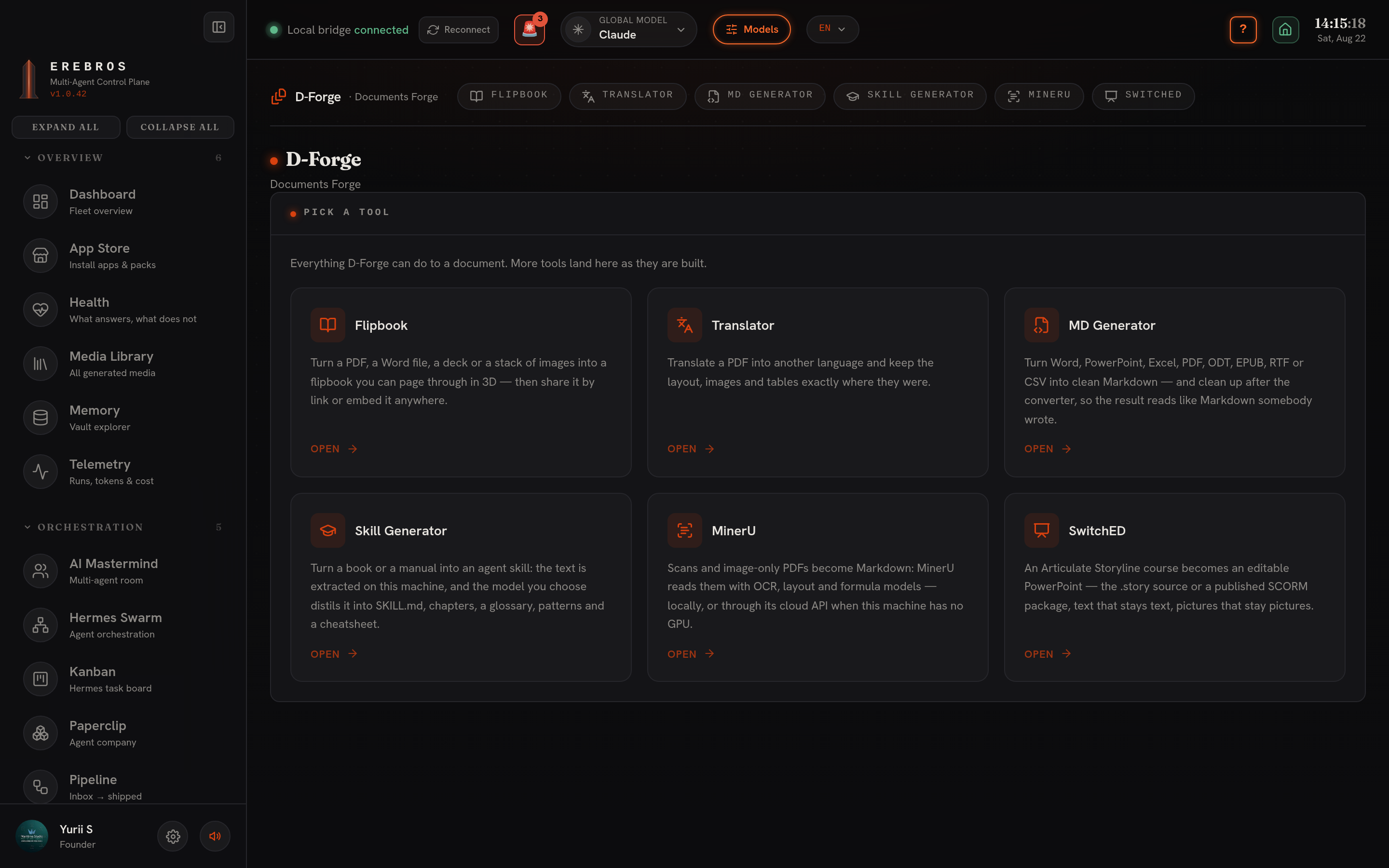
Six tools ship today, Flipbook, Translator, MD Generator, Skill Generator, MinerU and SwitchED. Everything saves into the vault under d-forge/, and nothing is uploaded: every conversion runs on this machine.
Flipbook
Section titled “Flipbook”Turns a document into a book that opens in the browser and turns pages in 3D.
- Input, drop files onto the canvas (or stage them in the FORGE panel): PDF, DOCX / PPTX / ODT / ODP (via LibreOffice) and images all work.
- Settings, set the DPI (72-300; higher is sharper and heavier, 144 suits most reading), the engine (
pdftoppmorpdftocairo) and the flip mode: 3d (a real page turn), slide or scroll. - FORGE runs as a background job with live stages, extracting, rendering, optimizing, thumbnailing.
- Vault panel, lists every book with rename, delete and Share. Share gives a link and a ready
<iframe>snippet, and flips a book between draft and published; the embed page carries no Erebros chrome, so it sits cleanly inside another site. The original file stays downloadable. - Output,
d-forge/Flipbook/<id>/(pages and thumbnails as WebP, plus the source file).
Translator
Section titled “Translator”Translates a PDF into another language while keeping its layout, images, tables and formulas, a free, self-hosted alternative to paid tools like DeepL Document. Built on the open-source pdf2zh-next (PDFMathTranslate).
- Source, paste a URL to a PDF or a local path, or Upload PDF.
- Into, the target language (Czech, Spanish, Polish, German, French, Italian, Ukrainian… 25+).
- Engine, the translation backend, all free: Google / Bing (no key, best coverage, the default), Ollama (a local model, fully offline), or Gemini via Erebros’s Antigravity proxy. For Ollama / Gemini you can name the Model.
- Translate, runs as a background job: leave for another app and come back, it is still going; a New session button starts fresh.
- Output, two PDFs, the translated one and a bilingual (side-by-side) one, with an inline preview and download links. Both save per project to
d-forge/<name>/in the vault and show in the Media Library. The tool’s promo watermark is stripped automatically.
MD Generator
Section titled “MD Generator”Any document to clean GitHub-Flavored Markdown, on this machine, with no models and no key. Drop an Office file, PDF or EPUB; it comes back as legible Markdown you can read, diff or feed to an agent.
- Runs as a background job; output lands in the vault.
- No OCR, an image-only PDF has no text to extract.
- Engine: @firecrawl/anydoc (pure Rust).
Skill Generator
Section titled “Skill Generator”Turns a book or manual into a Claude skill. Point it at a document; it extracts the text, plans a skill, and writes one out through the same skill gate as everything else.
MinerU tab
Section titled “MinerU tab”The document-extraction app now lives here as a D-Forge tab; its API is unchanged and the old /mineru route still opens it. See the dedicated MinerU reference for the full tab breakdown.
In short, MinerU converts PDFs, images and office docs (docx / pptx / xlsx) to Markdown straight into your Obsidian vault (~/Obsidian/Erebros/miner-u/<name>/<name>.md + images/). Four tabs, Convert (drag-drop, bulk Choose files, or Scan a folder; Local mode via the mineru CLI, or Cloud mode via mineru.net), Library, History and Settings.
SwitchED
Section titled “SwitchED”Turns an Articulate Storyline course back into an editable PowerPoint, text stays text, pictures stay pictures. Feed it the .story source or a published SCORM package; the format is read from what is inside, so you don’t have to say which it is.
- Input, drop a
.storyfile or a SCORM.zip. Options: Layers as extra slides, and Also render a PDF. - Output, an editable
.pptx(built with python-pptx) saved underd-forge/switched/, listed in the tool’s Converted library and in the Media Library.
Setup and dependencies
Section titled “Setup and dependencies”- Flipbook, poppler-utils (
pdftoppm/pdftocairo,apt install poppler-utils/brew install poppler) for page rasterising and, for office formats, LibreOffice (soffice). No key. - Translator, a Python venv (Python ≤ 3.13, ML deps have no 3.14 wheels):
python3.11 -m venv ~/.erebros/dforge/venv && ~/.erebros/dforge/venv/bin/pip install pdf2zh-next. Google / Bing need no key; a DocLayout model self-downloads on first run. - MD Generator, @firecrawl/anydoc at
~/.erebros/engines/anydoc(scripts/setup-anydoc.sh, ornpm install --prefix ~/.erebros/engines/anydoc @firecrawl/anydoc). No key. - Skill Generator, git and Python 3, in a venv at
~/.erebros/engines/book-to-skill(scripts/setup-book-to-skill.sh; clonesvirgiliojr94/book-to-skill). No key; falls back to system Python if the venv cannot be built. - MinerU, Local mode needs the
mineruCLI (uv tool install "mineru[core]"orpip install mineru[core]); Cloud mode needs nothing. Cloud upgrades to the Precise API withMINERU_API_KEY, or OpenXLabMINERU_ACCESS_KEY+MINERU_SECRET_KEY. - SwitchED, python-pptx (
scripts/setup-switched.sh, once) to build the deck, plus LibreOffice (soffice) for the SCORM path. No key. Falls back to an existing D-Forge / CourseGen venv if one is already built.
Where output goes
Section titled “Where output goes”Everything is written under the vault’s d-forge/ tree: d-forge/Flipbook/<id>/, d-forge/<name>/ for translations, and ~/Obsidian/Erebros/miner-u/<name>/ for MinerU. Results also surface in the Media Library.
- For Flipbook reading, DPI 144 balances sharpness against file size; raise it only for print-quality pages.
- Translator, MD Generator and the Skill Generator all run as background jobs, start one, switch apps, and return to a finished result.
- MD Generator has no OCR, so scan-only PDFs come back empty; run those through MinerU (with OCR) instead.