
Settings → Security
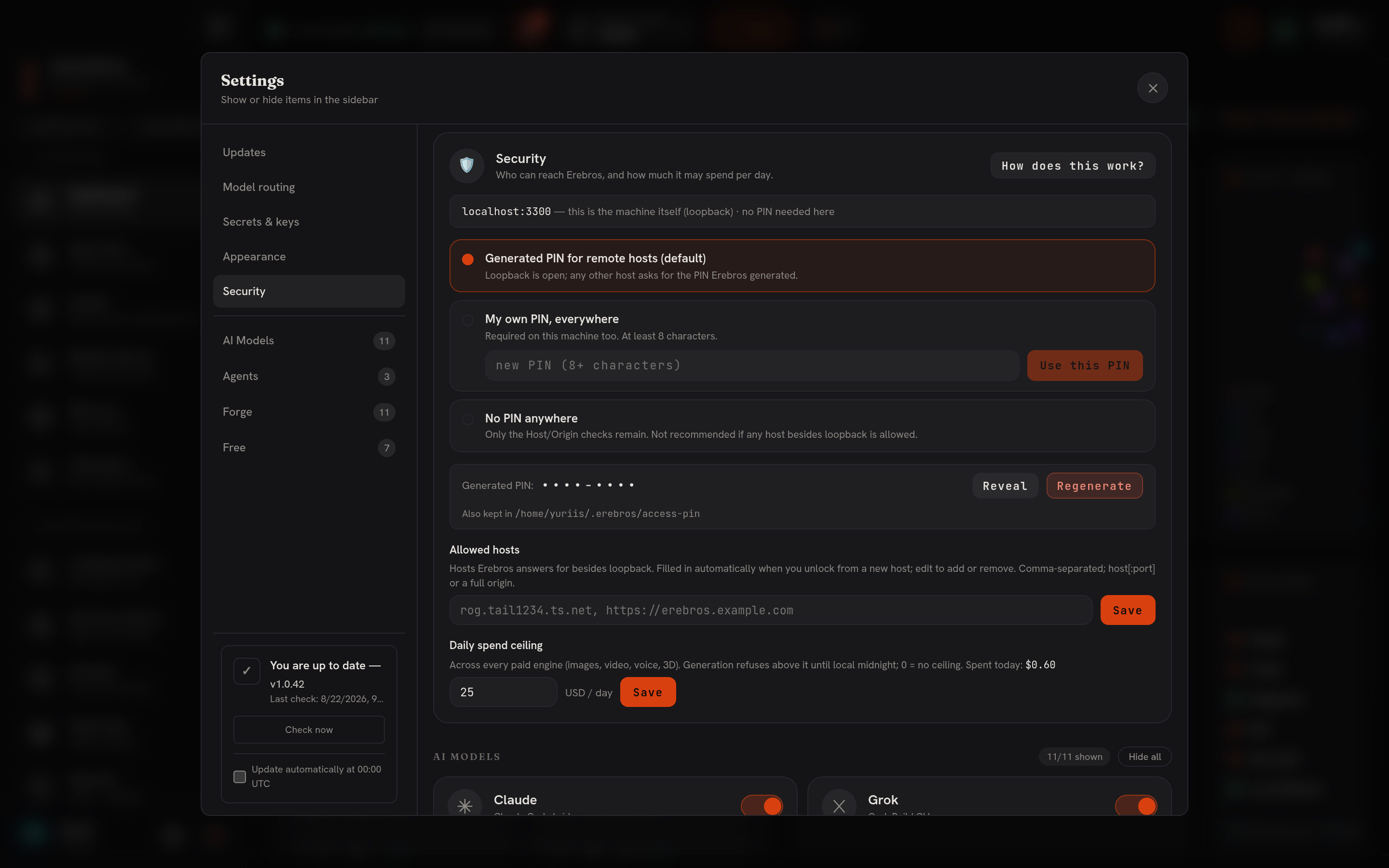
The Security card lives in Settings (the gear in the sidebar footer → Security in the left rail). It is the one place that decides who may reach this Erebros from another host and how much the paid engines may spend per day. The reasoning behind it is on Security & remote access; this page is the card itself.
What it shows
Section titled “What it shows”A status line at the top says whether this page is gated, the answer depends on
how you reached it: localhost is never gated; a Tailscale or LAN name is.
PIN mode
Section titled “PIN mode”Three radio choices:
- Generated PIN for remote hosts (default), loopback open; every other host asks
for the PIN Erebros generated at first boot (
~/.erebros/access-pin). Reveal shows it, Copy copies it, Regenerate makes a new one and signs every remote session out. - My own PIN, everywhere, type a PIN of 8+ characters; it is required on this
machine too. Equivalent to
EREBROS_ACCESS_PIN=<pin>in.env.local. Changing it signs every session out. - No PIN anywhere,
EREBROS_ACCESS_PIN=off. Only the host/origin checks remain. Unknown hosts then get421instead of an unlock screen.
Allowed hosts
Section titled “Allowed hosts”The EREBROS_ALLOWED_ORIGINS list as editable chips, host[:port] or a full origin.
A host that unlocks with the correct PIN is added here automatically; this is where
you review and remove them. An SSH tunnel arrives as localhost and needs no entry.
Daily spend ceiling
Section titled “Daily spend ceiling”EREBROS_DAILY_SPEND_USD, default 25. Every paid engine, images, video, voice, 3D,
upscales, refuses with HTTP 402 above it until local midnight. 0 removes the
ceiling. The card shows what was spent today, from the same meter
Telemetry reads.
How to use it
Section titled “How to use it”- Open Settings → Security.
- Leave the mode on Generated PIN unless you want a PIN on this machine too.
- Click Reveal and note the PIN before you open Erebros from a phone.
- Raise the ceiling on a heavy generation day; lower it for a shared machine.
- Changes apply immediately; the matching
.env.locallines are written for you. - Locked out after setting your own PIN? Remove
EREBROS_ACCESS_PINfrom.env.localand restart.