
Hermes
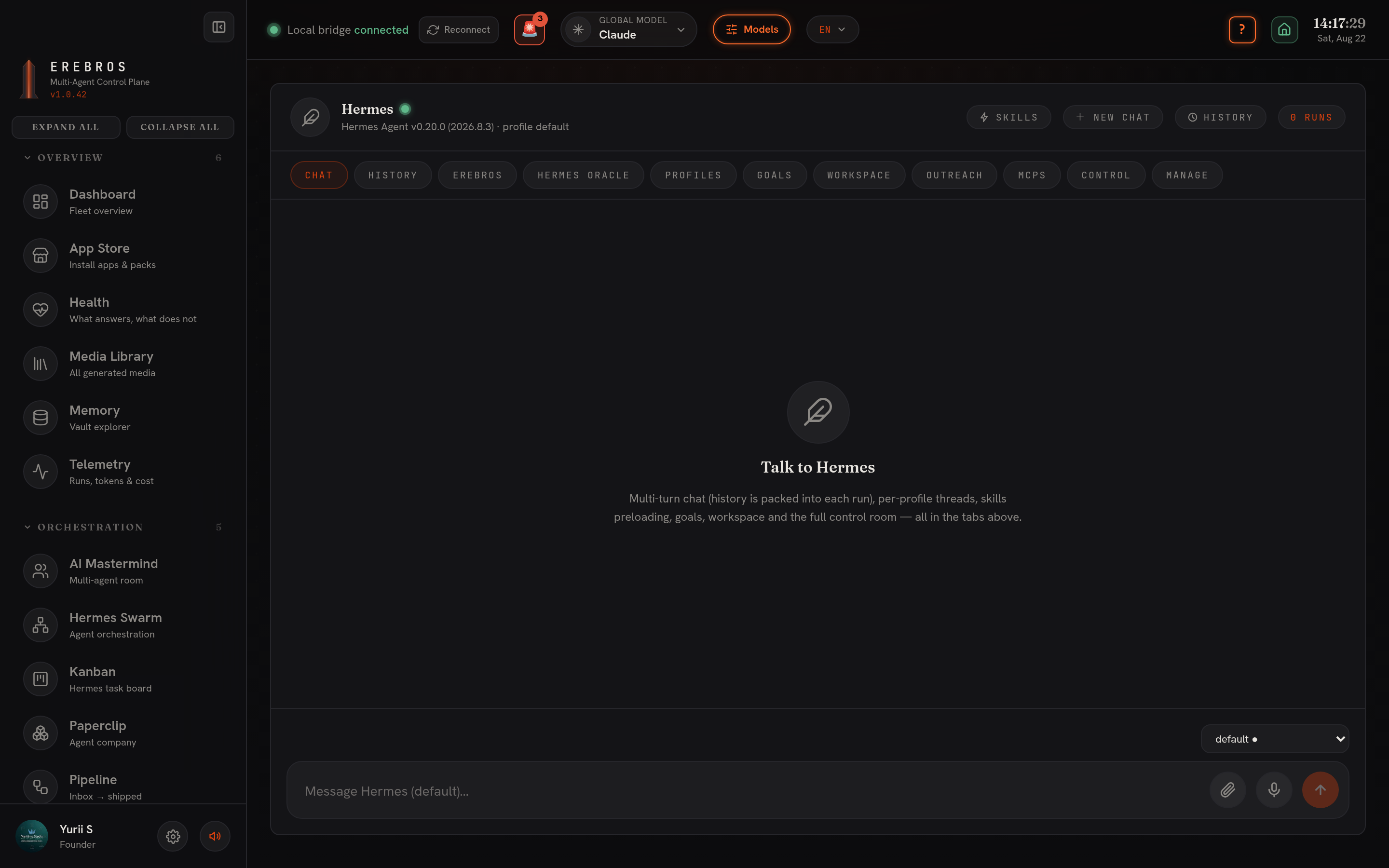
Hermes is the console for the Nous Hermes CLI agent, at /agents/hermes. Each message runs the CLI and streams its output.
What it does
Section titled “What it does”A multi-turn chat over the hermes CLI with the common Chat / History / Workspace tabs plus Control (status / doctor / insights) and an embedded Hermes dashboard. It uses its own skills registry (security-scanned), not the shared skills.sh picker. Autonomous Goals run detached with live logs.
Hermes supports multiple profiles. Selecting a profile (composer dropdown or the Profiles tab) switches the chat, the History dropdown and the History tab to that profile’s threads, each Swarm bot or locally-added profile keeps its own conversations. Selecting a profile also makes it the ACTIVE one (writes ~/.hermes/active_profile).
The profile you pick in Chat is the profile everything else in this console uses, Erebros escalates to it, Oracle sweeps with it, MCP servers install into it, and a Goal runs as it.
Key actions
Section titled “Key actions”- + New chat (header) starts a fresh thread; History lists and reopens past ones.
- Goals (Goal Mode), a detached, autonomous Hermes run with a live log. It runs as the profile you selected (shown on the card), and under the log you get the files it produced, one click from opening.
Erebros, the assistant
Section titled “Erebros, the assistant”Tap the mic and speak, or type. Three modes:
- Fast, one short answer, about a second. Chat only.
- Auto (default), it answers; when you ask it to open something it opens it, and when the request is real work (read a file, run something, search) it hands the job to a Hermes agent by itself.
- Agent, straight to a full Hermes run with tools. Slow, but it acts.
It listens and replies in whatever language the top-bar switch is set to (EN → English, RU → Russian, UK → Ukrainian); the button label follows (Tap · RU). Recognition runs on a local Whisper, nothing is uploaded, and the reply is spoken back by Supertonic; pick the voice (M1-M5, F1-F5) next to the toggle. The reactor above the conversation shows Erebros’s state (standby / listening / thinking / speaking / error).
Say “Erebros, remember …” and the line is kept in the Remembered panel and written into your Obsidian daily note. Briefing → Today / This week builds a spoken briefing from your notes, your open - [ ] tasks and what you told it to remember.
Hermes Oracle, the trend radar
Section titled “Hermes Oracle, the trend radar”Set a topic, press Sweep. One agentic Hermes run searches the live web for what broke in the last 48 hours and returns signals: heat (1-10), why now, the angle, and a source link. Draft a post turns any signal into a ready-to-paste post; every sweep is archived and appended to your vault. The sweep tries four searchers in order and reports which answered: your Hermes profile (where Grok’s x_search lands once you run hermes auth add xai-oauth), then Codex, then Erebros’s own model, and finally Hacker News (free, no key).
Outreach, cold email
Section titled “Outreach, cold email”Four steps, each usable alone: Find companies (plain English, needs a Firecrawl key, or paste domains by hand), Find the contact (Hunter.io if you have a key, else scrape the site), Check the addresses (Hunter’s verifier, or a local MX + SMTP probe), and Write the email then Send. Sending goes through your own SMTP server (Settings → Your mail server). Guardrails are server-side: a pause switch, a daily cap (25 by default), a circuit breaker (stops after five bounces), a suppression list, and a blocklist of ~60 mega-corps. Keys and the SMTP password live in ~/.erebros/hermes/outreach/config.json (mode 0600).
MCPs, tool servers for Hermes
Section titled “MCPs, tool servers for Hermes”The Nous catalog in a window (n8n, Linear, Unreal Engine and whatever hermes update brings). Install reads the entry’s manifest, asks for exactly the credentials it wants, and streams the install log; Test checks the connection, ✕ removes it. Add a server wires up anything outside the catalog (a stdio command or an HTTP endpoint). Servers install into the profile selected in Chat.
Setup / CLI / keys
Section titled “Setup / CLI / keys”- Requires the Hermes Agent CLI (
hermes). Check withcommand -v hermes; install per Nous Research. Self-managed credentials, check withhermes auth listandhermes status. The profile’s provider must have credit: a dead provider makes Hermes print the HTTP error as its answer; the assistant and Oracle detect that and fall back, but the CLI itself stays silent. - Erebros assistant (fast + auto modes), Oracle and Outreach use
OPENROUTER_API_KEYin.env.local(also read from the active Hermes profile’s.env). Agent mode, sweeps and Goals go through the CLI and need no key here. - Voice needs the free local engines:
Whisperfor the mic (~/.erebros/whisper) andSupertonicfor playback. Both are provisioned bybash scripts/setup-free-engines.sh; if the mic button is disabled, that step has not been run on this machine. - Outreach also uses
FIRECRAWL_API_KEY(find companies / scrape) andHUNTER_API_KEY(contact + verification), both optional, plus your own SMTP server (for Gmail:smtp.gmail.com, port 587, an app password).
- Hermes can be selected as the global model in the top bar.
- The console under Agents is the single-agent Hermes; the fleet-level node graph lives separately in Hermes Swarm.
- Installing the n8n MCP here is the shortest path to driving n8n from every Hermes agent (console, Swarm, Goals).