
Setup
The question this answers: what do I install where, and where do the conversations actually live?
The shape of it
Section titled “The shape of it”Every machine runs the whole product and keeps its own copy of the event log. One of them is the home; the others are clients. A client pushes what it writes to the home and listens for everything else; the home fans out.
The home is not a master. It holds the same signed log as everybody else; if it burns down, every machine still has the whole conversation, and any one of them can become the home by changing one setting. It exists because a laptop that is closed cannot be reached, and two laptops never open at the same time never converge.
A machine with no home address configured is the home. That is also the single-machine case: a fresh install talks to itself and needs no setup at all.
How the machines reach each other
Section titled “How the machines reach each other”Four arrangements; the difference is which machine can dial which. Pick one in Settings → Relay on the home; every other machine reads the choice off the log.
| What it is | Needs a secret | |
|---|---|---|
| One local network | Every machine in the same building. Nothing to install; nothing works away from that network. | No |
| Tailscale | Every machine gets an address that works from anywhere, behind any NAT. | No, the tailnet is private |
| One always-on machine at home | The default. Clients dial in from wherever they are. | No |
| Home on a public address | A VPS, or a port forwarded to a box at home. | Yes, the setting refuses without one |
A client only ever dials out, so a machine behind carrier NAT or a hotspot works
as a client today; it simply cannot be the machine everybody dials. A public address
is one the internet can join, set EREBROS_TEAMS_SECRET to the same string on every
machine first. It is not encryption; it buys exactly one property, a stranger cannot
join. Set it everywhere in one sitting: the failure mode is silent.
1 · Install on each machine
Section titled “1 · Install on each machine”Node 22.22+ (for node:sqlite), git, a POSIX shell.
git clone <your-repository-url> ~/erebros-tcd ~/erebros-tnpm cinpm run buildnpm start # http://localhost:3401Copy .env.example to .env.local and fill in the keys you have; every one is
optional. The variables that decide how the machine behaves on the network:
| Variable | What it does |
|---|---|
EREBROS_STATE_DIR |
Where the log, signing key, settings and jobs live. Defaults to ~/.erebros-t, deliberately not Erebros’s ~/.erebros, which shares seventeen filenames with it. |
EREBROS_MACHINE |
This machine’s name on the log and in every audit line. Defaults to the hostname. |
EREBROS_HOME_URL |
The home’s address. Set it and this machine is a client; leave it unset and it is the home. Settings → Relay can set it too, without a restart; the variable wins when both exist. |
EREBROS_TEAMS_SECRET |
The shared workspace secret. Absent means open, right behind a router, wrong on a public address. |
EREBROS_FORCE_CLOUD |
1 sends every capability to a provider regardless of hardware. See Compute. |
PORT / HOST |
Default 127.0.0.1:3401; the service sets 3401. A machine others must reach needs HOST=0.0.0.0. |
The one that looks like a network fault
Section titled “The one that looks like a network fault”A machine’s advertised address is read from its network interface; what it listens
on is HOST. Leave the default and the machine will confidently publish
http://192.168.1.42:3401 while accepting nothing but connections from itself, it
works perfectly as a client, can never be the home, and every screen says it is fine.
Environment=HOST=0.0.0.0Environment=PORT=3401Running it permanently
Section titled “Running it permanently”A systemd user service, so it runs as you and can read your keys:
[Unit]Description=Erebros-TAfter=network-online.target
[Service]WorkingDirectory=%h/erebros-tEnvironment=NODE_ENV=productionEnvironment=PORT=3401Environment=EREBROS_MACHINE=%HExecStart=/usr/bin/npm run startRestart=always
[Install]WantedBy=default.targetsystemctl --user daemon-reloadsystemctl --user enable --now erebrostloginctl enable-linger "$USER" # or it stops when you log out2 · Point the clients at the home
Section titled “2 · Point the clients at the home”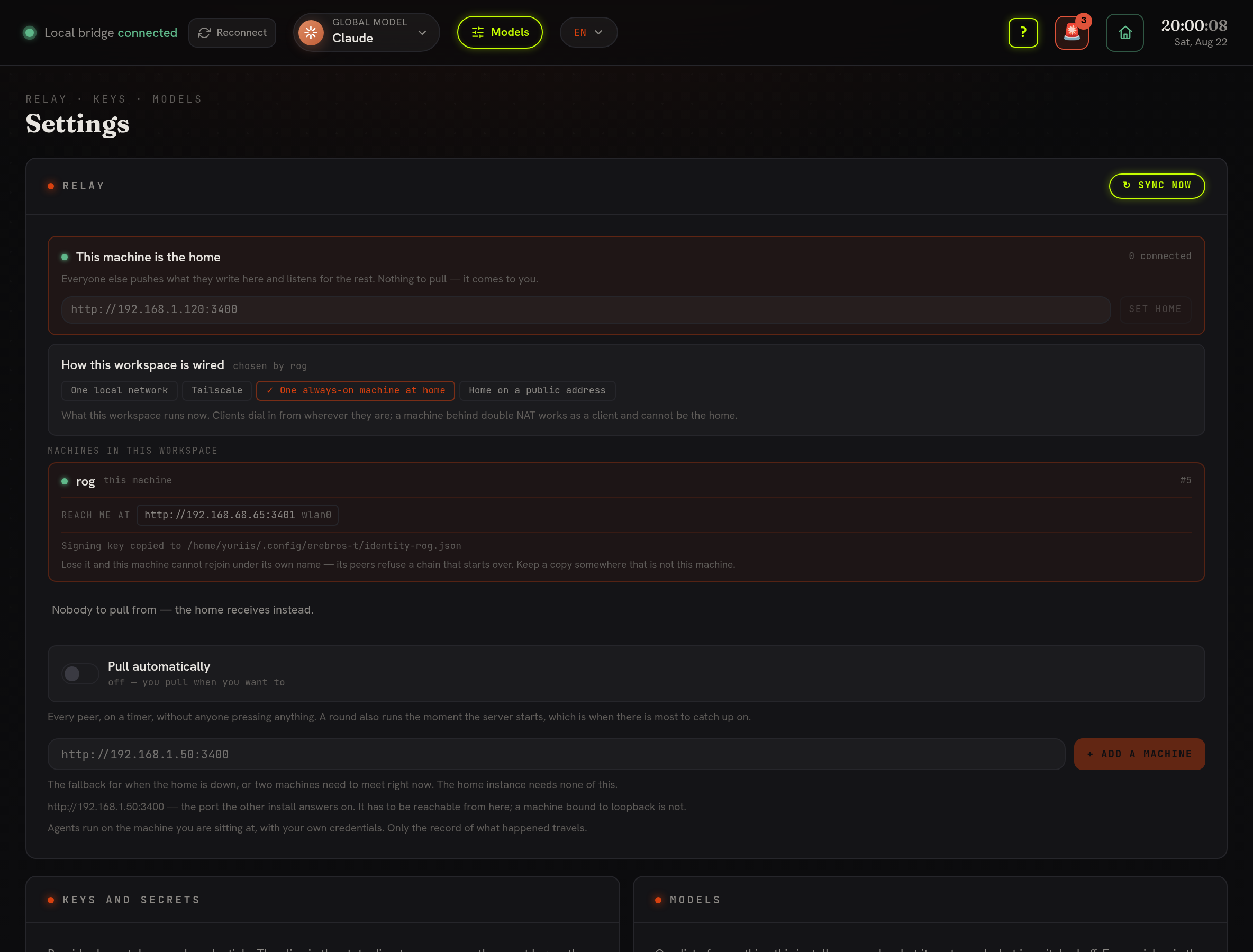
Everything on this screen lives under Settings → Relay: the home address and SET HOME, the four wiring choices (One local network / Tailscale / One always-on machine at home / Home on a public address), the list of machines in this workspace with each one’s reach-me-at address, the Pull automatically timer, and + Add a machine for a direct peer.
On the home, open Settings → Relay. Under the first row is “reach me at” - the addresses another machine can use, port filled in. Copy one. On each client, paste it into the home field and press SET HOME. Within seconds the panel says connected and the workspace’s whole history arrives.
To move the home later, press MAKE THIS MACHINE THE HOME on the new one and set its address on the others. Nothing is lost: every machine already holds the log.
If a client cannot reach the home, check the direction that matters, from the client:
curl -s -o /dev/null -w '%{http_code}\n' --max-time 5 http://<home-address>:3401/api/relay200 means the network is fine and the problem is configuration. For networks that
cannot see each other, put the machines on WireGuard or Tailscale and use that
address; each machine announces every address it has.
3 · Check it worked
Section titled “3 · Check it worked”curl -s localhost:3401/api/relay | jq '{me: .me.machine, role: .hub.role, connected: .hub.connected}'curl -s localhost:3401/api/events/verify | jqEvery machine’s chain is verified separately; ok: false names the sequence number
where the break is.
How the log travels, the protocol
Section titled “How the log travels, the protocol”The whole networked story is one deliberately dull mechanism. There is no broker, no server to elect, no membership protocol, and no shared sequence to allocate, the things that make distributed systems subtly wrong are simply absent.
Every machine has its own chain. Its events go into events/log.jsonl, one JSON
object per line, appended and never rewritten. Each line carries the hash of its
contents (SHA-256), the prev hash of the line before it, and an Ed25519 signature
over that hash made with the machine’s key from identity.json. A machine keeps one
such file per peer under events/peers/<machine>.jsonl, stored exactly as received.
Because each machine signs only its own chain, two machines can write at the same
moment, offline, on a plane, and neither can invalidate the other.
Replication is pull, and pull is append. A machine asks a peer “what do you have
after your event 40?”; the answer either links cleanly onto what is already held (each
event’s prev must match the last hash) or it is refused. Merging is therefore just
appending, nothing to reconcile, no ordering to get wrong. Two machines that have
never spoken converge the moment either one pulls; a machine that was off for a week
catches up in a single request.
- Pull is the primary direction because it works from behind NAT, works while the other machine is asleep, and cannot be used to make a peer write something it did not ask for. It runs on the Pull automatically timer, on server start, or on Sync now.
- Push exists for one job: a machine about to shut down hands over what it has so
nothing waits for the next pull. The receiver validates every event either way, a
bad signature or a broken
prevlink is rejected, not stored. - The home is just a well-known peer. In the “always-on machine” wiring, clients push to it and read from it and it fans out; it holds the same signed log as everyone else and is not a source of truth. Any machine can become the home by changing one setting, because they all already have the full chain.
What crosses the wire is only the log, messages, patches, CI runs, approvals,
decisions. Keys never travel (.env.local stays put), and agents always run on the
machine you are sitting at with your own credentials. Verify any machine’s chain at
any time:
curl -s localhost:3401/api/events/verify | jq # ok:false names the sequence where a chain breaksWhere everything lives
Section titled “Where everything lives”$EREBROS_STATE_DIR/ (defaults to ~/.erebros-t)├── events/│ ├── log.jsonl this machine's own chain, the one it signs│ └── peers/<machine>.jsonl one file per machine, exactly as received├── teams/│ ├── identity.json this machine's keypair. BACK THIS UP.│ ├── peers.json addresses of machines to pull from directly│ └── hub.json the home's address, if this machine is a client└── index.db SQLite full-text index, derived, delete it freelyidentity.json is the only irreplaceable file. Lose it and the machine cannot
sign new events; a new identity means a new chain under the same name.
index.db is disposable, if search behaves oddly, delete it.
Conversations you clear are also written to your Obsidian vault as Markdown under
memories/channels/<room>/.
What travels and what does not
Section titled “What travels and what does not”The log carries what happened: messages, patches, runs, approvals, decisions. It does
not carry your keys, .env.local stays on the machine it was written on, and
agents run on the machine you are sitting at, with your credentials. A private channel
is hidden, not encrypted: the log replicates everywhere; the setting decides what
the interface lists.
See also
Section titled “See also”- Proxmox deployment, a headless container without a GPU.
- Compute (Local / Cloud)