
Hermes Swarm
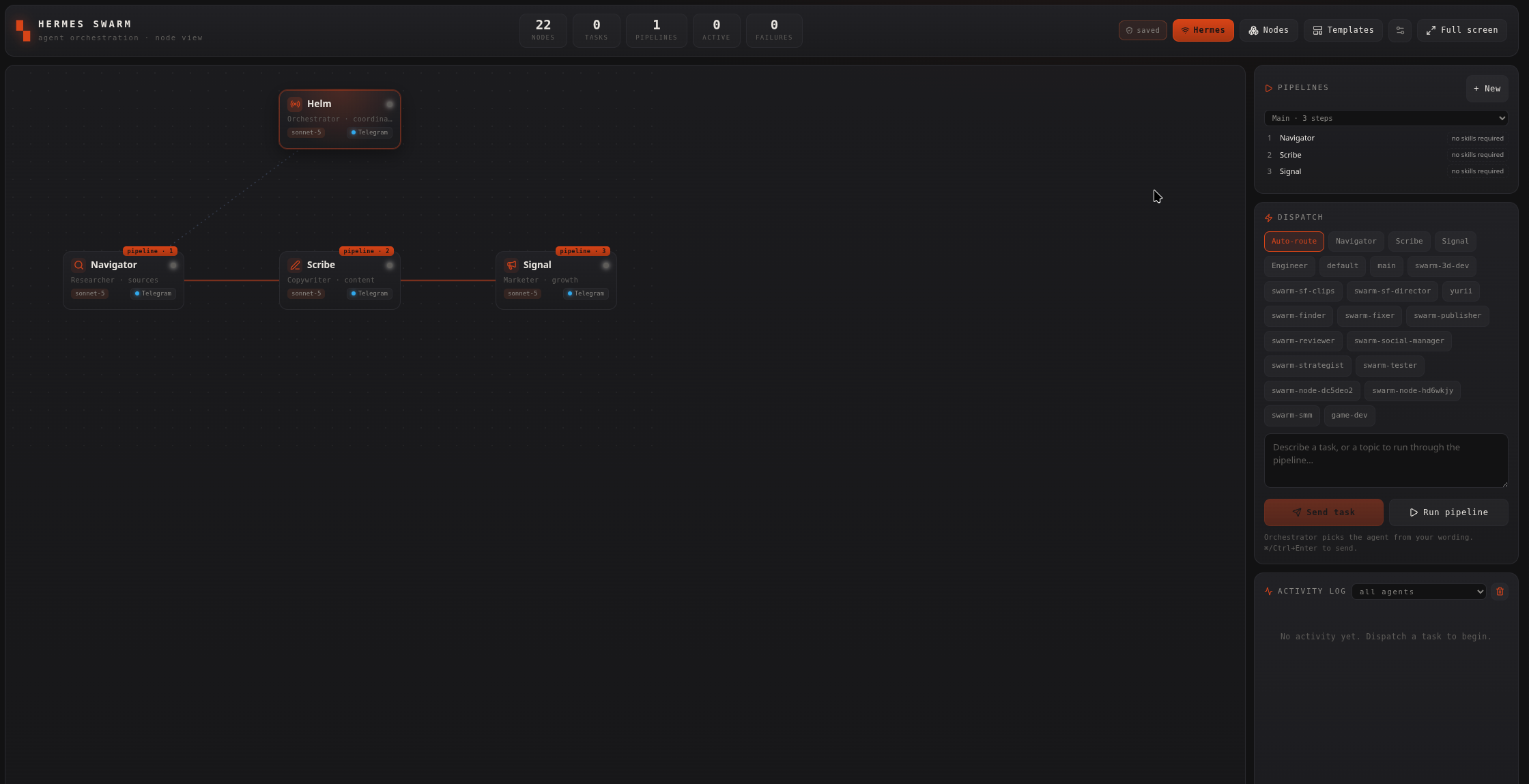
Hermes Swarm is node-graph mission control for your whole Hermes fleet, at /hermes-swarm.
What it does
Section titled “What it does”Shows the Orchestrator (Helm) plus sub-bots (Navigator / Scribe / Signal / Engineer) as draggable nodes, wired into a content pipeline with optional secondary links. It drives your existing Hermes install, it is not the single-agent Hermes console under Agents, which stays separate. Without the hermes CLI you get a setup card, and can still preview in Simulation.
Templates
Section titled “Templates”Templates (top-right) opens a library of ready-made multi-agent pipelines, 13 of them. Seven are software pipelines (New Feature, New Feature (Security), Bug Fix, known / unknown cause, Refactoring, Performance, Infrastructure); six cover non-coding patterns (Deep Research, Content Engine, Social Media Campaign, Sales Outreach, Customer Support, Evaluator-Optimizer quality loop). Each is a chain of roles (e.g. Scout → Strategist → Social Manager → Publisher), not a set of bots, nothing is created automatically.
- Pick a template and a wizard opens with one card per role. For each role you either Create new, name, messenger transport, its API key/token, and a model, or Use existing and point the role at a bot you already have.
- The model is auto-suggested from the role’s tier (fast / reasoning / coding / deep) out of the providers you actually have installed, preferring real models over free ones. You can always change it.
- Skills are a live search-picker, not free text: type and pick real skills from the registry (each chip carries its real id), pre-filled with sensible suggestions per role. On create they are installed into each node through the Skill Security Gate, verdicts appear in the activity log.
- Only when you press Create pipeline are the nodes created and the pipeline assembled and made active. The wizard closes immediately; provisioning and skill installs continue in the background.
- The whole library is localized (EN / RU / UK), template names, descriptions, role names and role prompts follow your interface language. Skill ids stay English because they are registry keys; each role prompt still carries an explicit “answer in the language of the request” line.
Nodes and bots
Section titled “Nodes and bots”- Your existing Hermes agents are already here. Every profile Hermes has, the ones you created in the Hermes console, plus
default, is picked up automatically and listed in ALL NODES. They arrive routing-only (not in the pipeline), so nothing runs on its own. Dispatch runs them on their real profile. - Every node is a bot you can fully edit, name, role, model, messenger, bot token, allowed user IDs, Connect, skills, in one panel, whether you created it, Erebros adopted it from a Hermes profile, or it drives S-Forge. An adopted node is wired on its own profile (its previous
.envis kept as.env.erebros-backup); a node Erebros created getsswarm-<id>. - Bind any node to S-Forge. Every node has an S-Forge binding: none, Director, Boards or Clips. Bound, its pipeline step runs S-Forge’s own libraries instead of the Hermes CLI, while staying a normal bot otherwise. The ❖ Swarm button in S-Forge seeds three such nodes for you.
- Add a bot / connect a messenger. Open Nodes (top-right), fill Name / Role / Model / Transport (Telegram, Discord, WhatsApp, Slack, …), then the transport fields. For Telegram you need the Bot token (from @BotFather) and the Allowed user IDs, the numeric Telegram user IDs permitted to talk to the bot (comma-separated for several). Token fields are encrypted, after you save one it shows
•••• setand is never displayed again. - Profiles are created automatically. The moment you add a messenger node, Erebros provisions its dedicated Hermes profile (
swarm-<bot>) and sets its model/provider. (Needs thehermesCLI and Hermes mode; skipped in Simulation.) - Switch the AI model per node. Expand a bot under All nodes, the AI model dropdown lists the providers you actually have installed in Hermes, each with the models Hermes itself last fetched, plus any local Ollama models. Authenticate a new provider in the Hermes CLI and its models show up here. If one arrives without models, run
hermes model --refreshonce. - Assign skills to a bot (security-checked). Use Skills in a bot’s settings to search and add skills. Every skill is downloaded to a quarantine and run through the Skill Security Gate before it touches the bot: clean skills install into that bot’s Hermes profile, a REVIEW verdict asks you to confirm, and a REJECT is blocked.
- Connect (bring the bot online). Expand the bot under All nodes and click Connect. Erebros writes the token + allowed users into its Hermes profile (
swarm-<bot>) and starts a persistent Hermes gateway service for it, this is what actually connects the bot to Telegram. The badge turns connected (green) once it is live and survives reboots. Disconnect stops and removes that bot’s gateway and clears its token. Each bot is a separate Telegram bot; your existing personal Hermes bot is untouched.
Wiring and running
Section titled “Wiring and running”- Wire the pipeline & links. In Nodes, append/insert bots into the pipeline, or add secondary connections (e.g. any bot → Engineer). You can also draw links on the canvas with Link nodes. Drag nodes to arrange; click a link to remove it.
- Run. Type a task and Send task (Auto-route lets Helm pick the bot from your wording, or target one directly), or Run pipeline to flow a topic through the chain. Switch the header toggle from Simulation to Hermes to dispatch for real; watch the Activity log.
Each bot is bound to a fixed role, Helm = Orchestrator, Navigator = Researcher, Scribe = Copywriter, Signal = Marketer, Engineer = Coder, with its own identity, special rules, team awareness and role boundaries. It stays in-role on both Telegram DMs and dashboard dispatch, and politely redirects out-of-role requests to the right teammate. The role lives in each Hermes profile (SOUL.md + AGENTS.md), so it applies wherever you talk to the bot.
Every chat, dispatched task and piece of generated/researched content is mirrored into Obsidian as markdown, one note per session, under ~/Obsidian/Erebros/hermes/hermes-swarm/<Bot>/. This covers both dashboard dispatches and live Telegram conversations, and runs on a background timer (every few minutes) plus right after each dispatch. Point it elsewhere with HERMES_SWARM_VAULT_DIR.
Setup and security
Section titled “Setup and security”Requires the hermes CLI (command -v hermes). Bot tokens live encrypted in ~/.erebros/hermes-console/secrets.json (outside the repo), keyed by HERMES_CONSOLE_KEY in .env.local, generate one with:
node -e "console.log(require('crypto').randomBytes(32).toString('hex'))"The Backend tab shows whether encryption is active. Your topology (nodes, pipeline, links) auto-saves and restores on reload; an exported backup contains no tokens.
- Use Simulation mode to preview a pipeline before dispatching for real, and when the
hermesCLI is not installed. - Deleting an adopted node keeps it deleted, so prune the routing-only bots you do not want.