
M-Forge
M-Forge is the unified media hub, at /m-forge, one place for every kind of media you make in Erebros. Its top-level tabs are AI-Vision, Compose, Remove Watermark, Studio (Story / Cut / Dub), OpenMontage, Music, Thumbnails, and the in-browser Media Content Lab. OpenMontage, Music and Thumbnails were previously standalone apps and are now tabs here.
AI-Vision
Section titled “AI-Vision”Let a model watch a video. Paste a URL (YouTube/Loom/TikTok/… via yt-dlp) or a local file, pick a Task (Summarize, Transcribe, Key moments, Hook analysis, Notes, Diagnose bug, or free-form) and a Language, and the model answers grounded in the actual frames plus transcript.
- Runs as a background job, keeps going if you switch apps (a Running badge shows on return).
- Reuses the processed video for follow-up questions (no re-watch).
- Mirrors every answer to your Obsidian vault at
~/Obsidian/Erebros/vision/. - Model dropdown lists the vision models your keys enable: Claude reads frames natively; Gemini / GPT-4o / Kimi / OpenRouter get the frames as images.
- Output language is guaranteed by the model, so even English captions come back in the language you picked.
- ⤢ goes fullscreen; + New session starts a new video while keeping your history.
Works on Windows, macOS and Linux. Fetching a video from YouTube needs a JavaScript runtime, and Erebros hands the downloader the Node it is already running on rather than asking you to install one.
Compose
Section titled “Compose”Commissions animated HTML video compositions via a Claude Code run, with preview and a Projects list (formerly the standalone Video app). Requires the claude CLI.
Remove Watermark
Section titled “Remove Watermark”Remove or add watermarks and logos on images and video. A Pipeline selector switches between:
- Local · on-device, your own
~/wm-engine(GPU). Image = LaMa inpaint of a painted mask; video crops around your box and offers Smooth · LaMa (fast, less flicker; default), ProPainter (flow-based, virtually zero flicker, best, but slow, ~30-40 s per second of video), and Sharp · LaMa (per-frame). Fully offline, no token, no limits; a status badge shows the GPU. Needs the one-time engine setup. - Cloud · HF Space, proxies to
smmisha/watermark-remover(Gemini/LaMa/OpenCV) via its REST API, keepingHF_TOKENserver-side.
Three tabs:
- Image, brush a mask, or use the box tool. Results save to
wm-removal/. - Video, drag a box; live frame counter and progress bar on long jobs. Results save to
wm-removal/. - Add logo / text, drop an image/video, draw a box you can move & resize, drop a logo PNG or text/note with colour and opacity → burned in with ffmpeg. Results save to
overlays/.
Everywhere the source frame has zoom, buttons plus mouse-wheel (up to 16×; scroll to pan), for precise selection. (Removal outputs also land under mwm-removal/.) All results save to your Obsidian vault.
Studio
Section titled “Studio”Two, now three, production pipelines, picked with a mode card (like P-Forge’s course/presentation split). All are ports of paid Claude skills onto Erebros’s free engines.
A written story becomes a sequence of illustrations that keep the same characters, locations and style from scene to scene. It writes a visual “bible”, draws one reference plate per character/location, then draws every scene with those plates attached so the red-haired girl stays the same girl throughout. Free on Gemini via the Antigravity proxy. Lands in ~/Obsidian/Erebros/story/<slug>/.
A raw talking-head recording becomes a clean edit. It transcribes to word-level timings (auto-selects Groq’s free Whisper tier if GROQ_API_KEY is set, else a fully local faster-whisper), the model you pick decides which spans to remove (filler words, false starts, dead air, conservative by default), long silences are trimmed deterministically, and ffmpeg renders one seamless master. The model never touches ffmpeg, it only makes the editorial call on text. Masters land in ~/Obsidian/Erebros/studio-cut/.
Voice-over into another language. Give it a local file, an upload, or a YouTube/URL (fetched with yt-dlp). It transcribes with timings, translates each line with the model you pick, speaks it, and fits every clip back onto the original timeline. Run a 10-second preview first to dial in the settings, then the full dub.
- Two TTS engines, free Supertonic (31 languages, offline, voices F1-M5) or ElevenLabs with a model picker (v3 / multilingual v2 / turbo / flash / v1) and its own voice list.
- Fine-tuning, tempo, timbre (pitch), music level, plus ElevenLabs stability / similarity / style.
- Keep original music, mixes the new voice under the source music; turns on once demucs is installed.
- Output, plays right in the tab and downloads as .m4a or .mp3; a video in gives a dubbed .mp4 out. Lands in
~/Obsidian/Erebros/studio-dub/.
DUB is a background job with a New session button, leave for another app and come back, it is still going.
All three Studio pipelines run on free engines by default; DUB’s ElevenLabs option is the only paid path and needs ELEVENLABS_API_KEY in .env.local.
OpenMontage
Section titled “OpenMontage”AI “movies”, a longer Claude Code run assembles a composition in your OpenMontage repo, tracked by pid plus output file (formerly the standalone OpenMontage app). Change folder to point at your repo if you cloned it elsewhere. During a run the agent may start a live Backlot storyboard on http://127.0.0.1:4750; Stop Backlot shuts it down (cancelling a render stops only the Claude agent, not Backlot). Needs the claude CLI (logged in) and ffmpeg on PATH; the default repo path is ~/OpenMontage (override with OPENMONTAGE_DIR). Movie mode uses fal.ai (Veo / Kling / MiniMax / Seedance), set FAL_KEY. Renders land at ~/.erebros/openmontage/<id>.mp4 and appear in Media Library.
A Suno music studio (formerly the standalone Music app). Pick a model, enter a prompt (optionally instrumental) and generate; finished tracks and covers land on disk, with your remaining Suno credits shown in the tab. Needs SUNO_API_KEY in .env.local (from sunoapi.org). Output saves to ~/.erebros/music and appears in Media Library.
Thumbnails
Section titled “Thumbnails”Social Networks Posts Covers, generates social covers and posts with fal.ai image models (formerly the standalone Thumbnails app). Describe a cover (or ask for a redesign), pick a Model (FLUX.1 schnell / dev, FLUX1.1 pro / ultra, Recraft V3, Ideogram V3, each showing its ≈ price per image), a Format / size (universal ratios plus YouTube, Instagram, TikTok, X/Twitter, Facebook, LinkedIn, Pinterest and OG presets) and a count. Needs FAL_KEY (also accepted as FAL_API_KEY); KIE_API_KEY optionally adds kie.ai as a second provider. Output saves to your vault under Thumbnails/ and appears in Media Library.
Media Content Lab
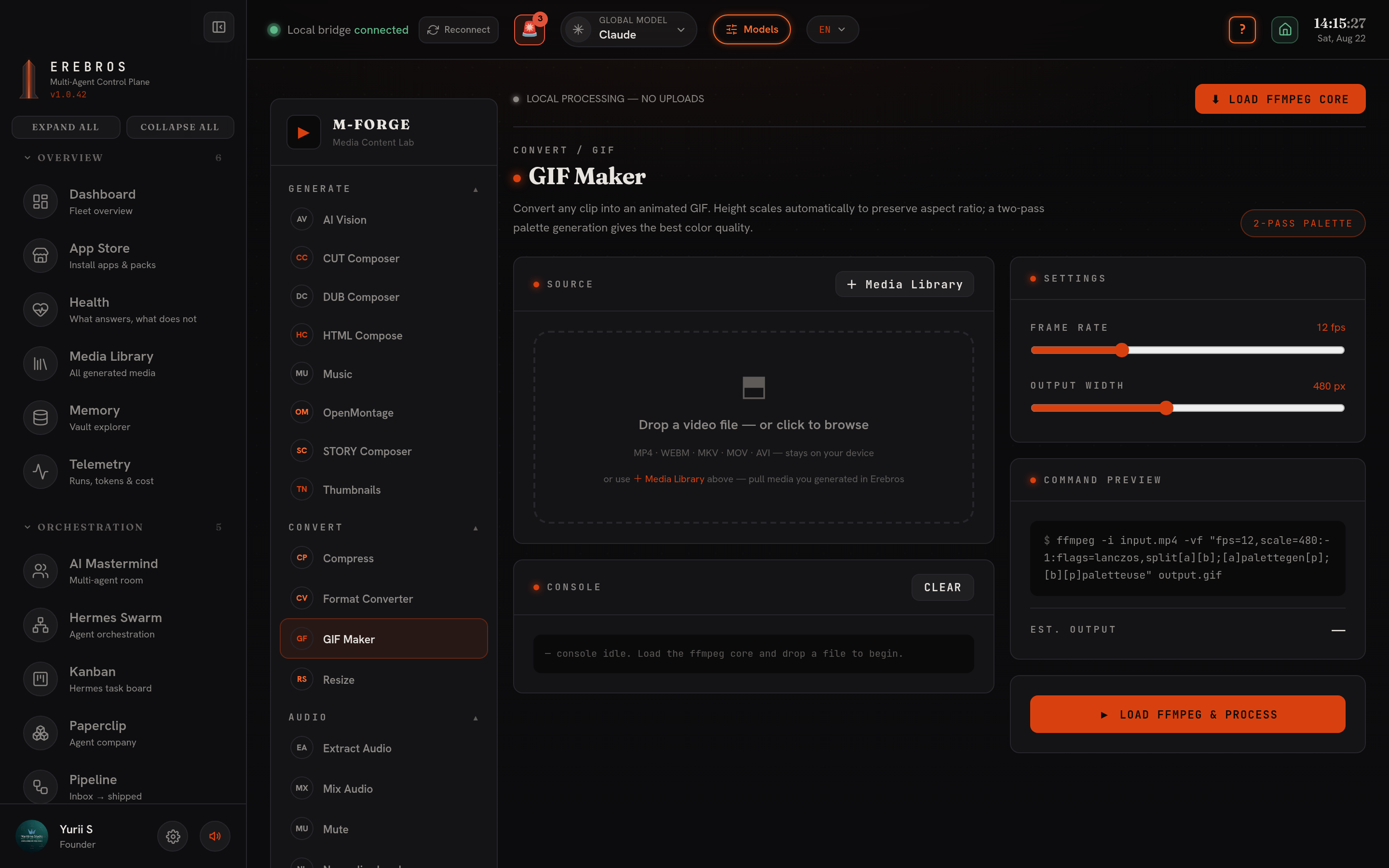
Section titled “Media Content Lab”An in-browser ffmpeg.wasm lab: ~29 quick media operations that run entirely in your browser, nothing uploads, nothing leaves your machine. The op families cover GIF maker, compress, format-convert, resize, extract / mix / mute audio, trim, speed and more. Because it is fully client-side it needs no key, no engine and no network.
- Media Library picker on every file field, instead of hunting on disk, pull in media you already generated in Erebros (S-Forge, OpenMontage, Music, Thumbnails, Studio, …) straight from your Media Library.
- Auto-save to the vault, lab output is saved to your Obsidian vault automatically, so it shows up alongside everything else you have made.
- yt-dlp, for URL sources in AI-Vision and Studio → Cut / Dub (YouTube/Loom/TikTok/…). Local-file/upload sources need only ffmpeg. Install a standalone binary to
~/.local/bin(orbrew install yt-dlp). yt-dlp is also provisioned byscripts/setup-free-engines.sh. - ffmpeg, required across watermark burn-in, Cut and Dub.
- Compose, the
claudeCLI logged in. - Remove Watermark · Local, the one-time
~/wm-enginesetup:bash scripts/wm-engine/setup.shthenbash scripts/install-autostart.sh --now(registerswm-engine.serviceon:8189). Needs python3.11 (PyTorch has no 3.14 wheels), ffmpeg and ~6 GB disk; an NVIDIA GPU is optional but recommended (CPU fallback otherwise). Override the target withWM_ENGINE_URL, the device withWM_DEVICE=cpu|cuda. - Remove Watermark · Cloud, nothing to install; set
HF_TOKEN(kept server-side). - Studio · Cut / Dub transcription,
GROQ_API_KEYselects Groq’s free Whisper tier; without it a local faster-whisper in the Studio venv is used (~/.erebros/studio/venv), no key. (Groq here serves Whisper, it is not xAI’s Grok.) - Studio · Dub, free Supertonic (
~/.erebros/supertonic/venv, provisioned byscripts/setup-free-engines.sh) is the default TTS; ElevenLabs (ELEVENLABS_API_KEY) is the paid alternative. keep original music needs demucs in the Studio venv (~/.erebros/studio/venv/bin/pip install demucs, pulls torch, ~2 GB). - Studio · Story, free on Gemini via the Antigravity proxy.
- AI-Vision keeps the processed video, so ask follow-up questions without paying to re-watch.
- For zero-flicker watermark removal on video use ProPainter, but expect ~30-40 s per second of footage; use Smooth · LaMa when speed matters.
- In DUB, always run the 10-second preview before the full dub to settle tempo, timbre and music level.
See also
Section titled “See also”- S-Forge, the AI film director; its Studio pipelines are also ported paid skills.
- P-Forge, shares the same free Supertonic/ElevenLabs voice stack.
- Local-first