
N-Forge
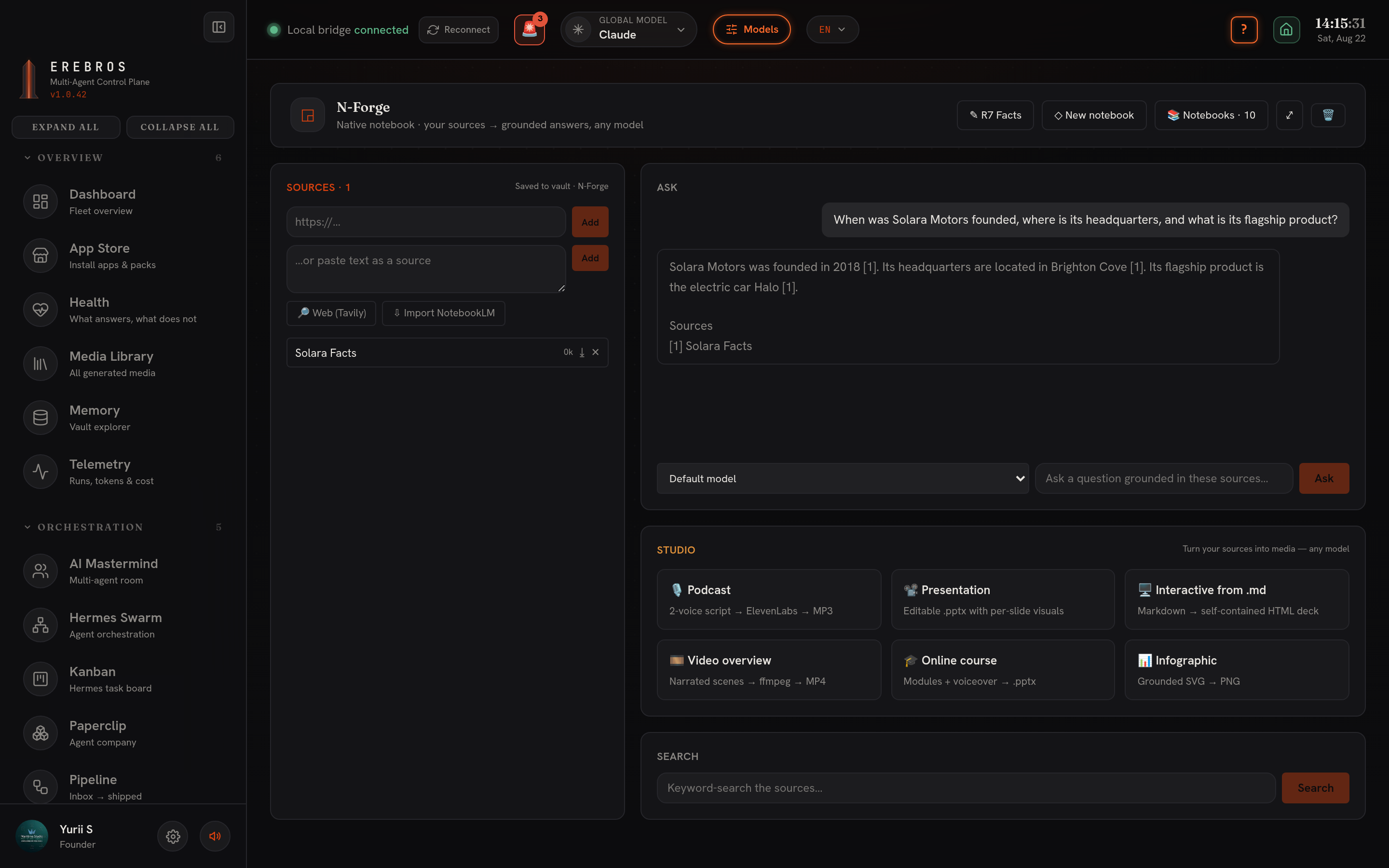
N-Forge is a native notebook at /n-forge, the NotebookLM idea fully inside Erebros, on any model (Claude / Grok / Kimi / Antigravity / local). Build a notebook from your own sources and get answers strictly from those sources, each with [n] citations.
Purpose
Section titled “Purpose”Grounded question-answering over documents you supply. Retrieval is native keyword matching (no vector DB); the answer always comes back in the question’s language. Ask runs as a background task, so you can keep working, and there is also a keyword Search over sources.
Adding sources
Section titled “Adding sources”Four ways to add sources:
- URL, Erebros fetches and extracts the page (better with Firecrawl).
- Pasted text.
- Tavily web search, needs
TAVILY_API_KEY. - Import from Google NotebookLM.
Up to 300 sources per notebook.
Import a whole Google notebook
Section titled “Import a whole Google notebook”“Import everything” pulls a Google notebook in one click: its source index, saved notes and text artifacts (reports, briefings, study guides) become answerable content, and generated media downloads into N-Forge/<notebook>/media/:
- audio → MP3
- video → MP4
- slide deck → PDF + PPTX
- infographic → PNG
- mind-map → JSON
- data-table → CSV
- quiz / flashcards
Import runs in the background and auto-renames to the Google title.
Notebooks library
Section titled “Notebooks library”The Notebooks library lists your notebooks. Click a source to view / edit it in-app; the Media / files section plays audio, video and images and renders reports inline.
Studio
Section titled “Studio”Turn a notebook’s sources into media, on any model:
- Podcast, two-host narrated audio via ElevenLabs.
- Presentation, Markdown to PPTX / PDF, rendered by marp-cli (provisioned by default). Falls back to a Marp
.mdif marp-cli is unavailable. - Interactive page.
- Video.
- Course.
- Infographic.
Pick a generator card, optionally refine, and the result lands in the notebook’s media/ folder. Apart from Presentation, the generators are model-only.
Setup and dependencies
Section titled “Setup and dependencies”- notebooklm-py, full source text and media import (venv
~/.erebros/nblm/venv, provisioned byscripts/setup-nblm.shorscripts/install-autostart.sh). If the backend is absent, N-Forge falls back to a name-only reader (nothing breaks). - notebooklm-mcp, holds the Google NotebookLM sign-in (
npm i -g notebooklm-mcp). Auth is bridged automatically from your existing Notebook (/notebook) login, no second sign-in. - patchright Chromium (bundled), Google sign-in and notebook import; set
NOTEBOOKLM_BROWSER_CHANNEL=chromium(no Google Chrome needed). - @marp-team/marp-cli, Studio Presentation export (provisioned by default via
scripts/setup-nforge-studio.sh); renders through your existing Chromium (CHROME_PATH). TAVILY_API_KEY, for the Tavily web-search source.ELEVENLABS_API_KEY, for the Studio Podcast generator.
Where output goes
Section titled “Where output goes”Everything saves to the vault under N-Forge/<notebook>/: notebook.json, sources/*.md, and media/.
- Answers are constrained to your sources, if a fact is not in a source, N-Forge will not invent it; add the source and re-ask.
- Ask and import both run in the background, so you can queue a large import and keep working.